

Carter's children's clothing has always been a popular brand among moms in China. Many Chinese mothers shop for kids' clothes on this website. Now, the official Carter's website has also optimized the shopping experience for domestic users. Today, I'll share a guide on how to shop on the Carter's official website. New parents can pay attention to this Carter's overseas shopping guide.
As a leading brand in the U.S. infant and children's clothing market, Carter's was created by Mr. William Carter in 1865 in Needham, Massachusetts, USA. The very first Carter's product was knitted in Mr. William Carter's kitchen.
The starting point for Carter's product lines is to help solve problems for moms, designed around the real concerns of moms, dads, and children. The products offer excellent quality and great value, making dressing and undressing babies easier than ever before. Using the softest fabrics, with colors, cuts, and techniques that have a unique, fresh style, they are irresistible. Words like "comfortable, soft, cute, easy, great for gifting, and trustworthy" can be used to describe Carter's products. Carter's focuses on a baby's earliest experiences, building an emotional connection between mother and child. The advantages of Carter's products lie in their practicality, comfort, and softness.
The Carter's product line includes core items needed for infants and children, such as baby collections, sets, lightweight wear, and sleepwear. The starting point for Carter's product lines is to help solve problems for moms, designed around the real concerns of moms, dads, and children. The advantages of Carter's products lie in their practicality, comfort, and softness. Whether it's the soft fabrics or the uniquely fresh colors, cuts, and techniques, they are all irresistible. In terms of price, the Carter's official website often offers 40% off, which is very attractive.
Official website link: https://www.carters.com
Payment Methods / Shipping Information
The Carter's official website supports direct shipping and freight forwarding. It accepts VISA, American Express, MasterCard, and PayPal online payments. Additionally, the Carter's website now also supports UnionPay card payments and Alipay, making it much simpler.

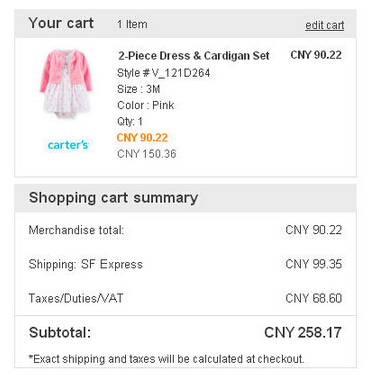
Direct shipping from the Carter's website uses SF Express. The shipping costs are relatively high, and customs duties are prepaid. Overall, using a freight forwarder is more suitable.
Simplified Ordering Process on the Carter's Website
1. Registering a Carter's Website Account
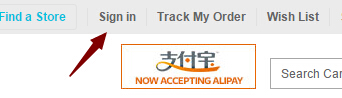
1. Enter the Carter's official website. First, find "Sign In" at the top to go to the login/registration page.
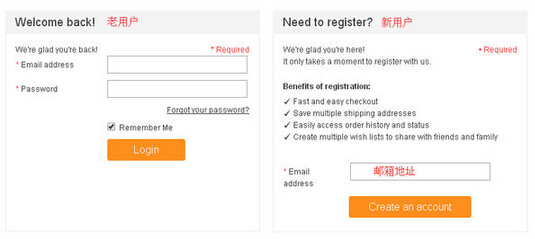
2. Those already registered log in on the left; those not registered click on the right side. Enter your email address in the email field, then click the "Create an account" button to create an account.
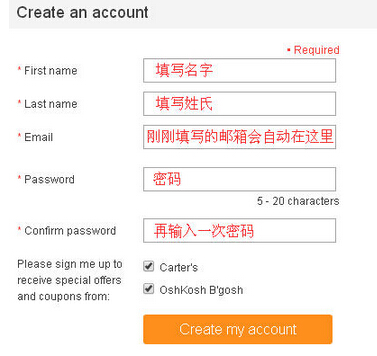
3. Fill in your name, email, password, and other information, then click "Create an account" to complete the registration.
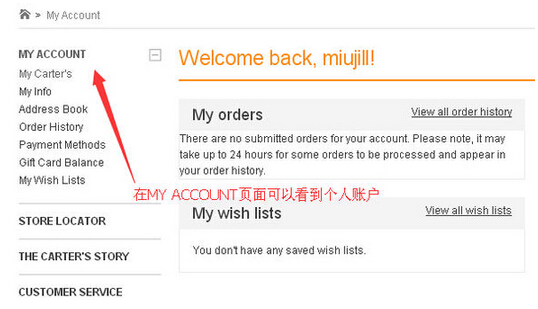
4. On the MY ACCOUNT page, you can view your personal account. After successful registration, you can enter the homepage to select products.
2. Simple Operations on the Carter's Website
1. The Carter's official website sells children's clothing and shoes for different age groups, including baby girl/boy, toddler girl/boy, and kid girl/boy for various types of clothing from childhood to adolescence.
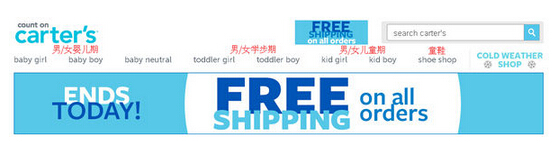
2. There are many promotional activities on the official website, usually visible on the homepage.
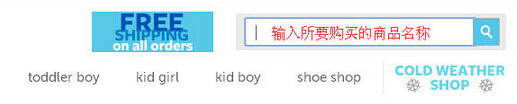
3. The Carter's website also has a search bar. You can enter the keywords for the product you want to buy in the upper right corner. After inputting, press the Enter key or click the magnifying glass button on the right to enter the search page.
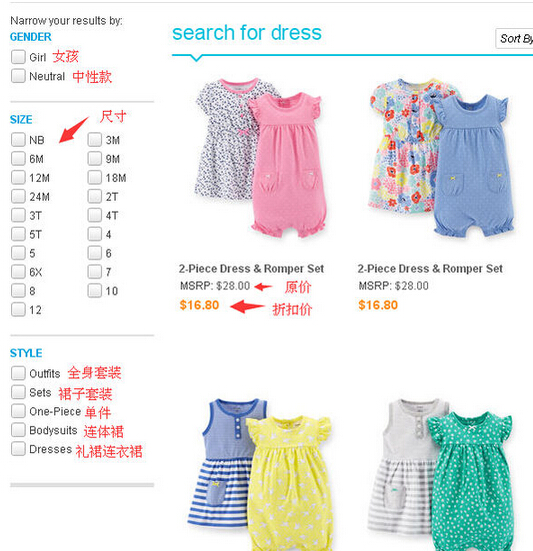
4. For example, searching for "dresses" will display a page like the one below. You can check detailed information in the left navigation bar, such as size, style, etc., to find the desired product faster.
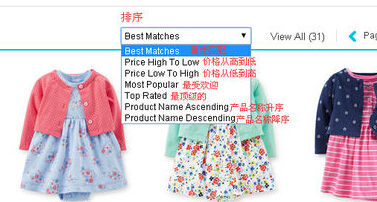
5. After searching, you can sort according to your needs, such as by price, popularity, etc., similar to domestic e-commerce sites.
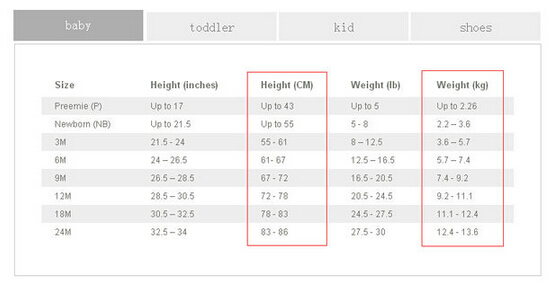
6. The Carter's official website has a very detailed size chart. Remember, it's better to buy baby clothes a size larger than smaller.
7. After selecting products for your baby, you can click "add to cart" to add them to your shopping cart.
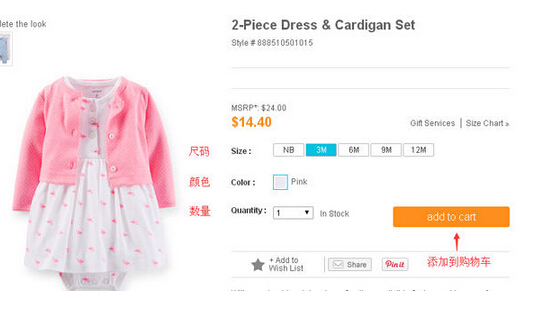
3. Tutorial for Placing an Order on the Carter's Website
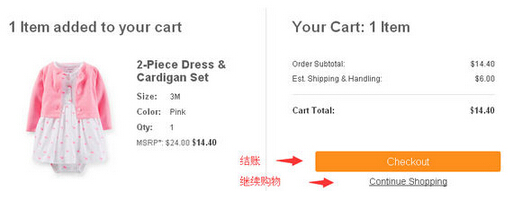
1. After adding items to the cart, you can click "Checkout" to proceed to the checkout steps, or click "Continue Shopping" to keep shopping.
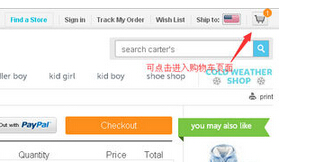
If you close the checkout page, you can also click the shopping cart icon in the upper right corner to enter the cart page to modify or checkout.
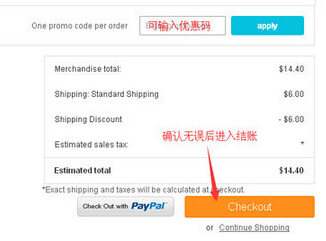
2. Click "Checkout" to enter the checkout steps. You can enter a promo code if you have one. After confirming everything is correct, proceed to checkout.
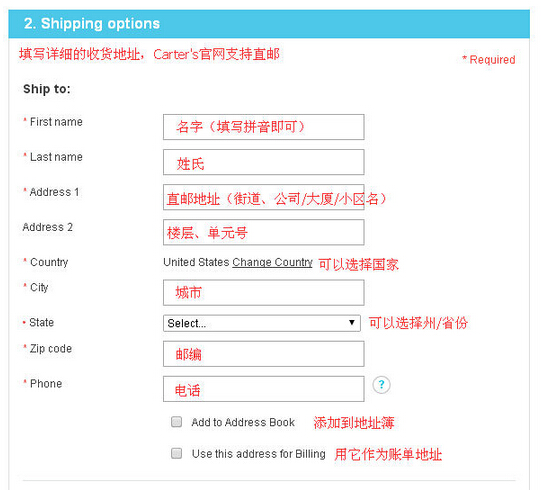
3. Fill in the detailed shipping address. For domestic addresses, just fill them in using Pinyin. If you didn't fill in an address during registration, you need to enter it step by step. You can check "Use this Address for Billing" to set this address as the billing address (it is recommended not to check this and enter your real domestic billing address in the next step).
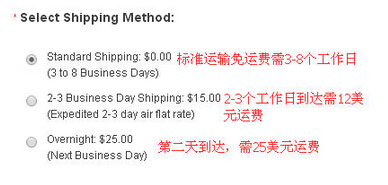
4. The Carter's official website supports direct shipping. The delivery methods are DHL International Express and SF Express. The specific prices are as follows.

5. After confirming the shipping address, select the shipping method below. Different shipping methods have different shipping costs.
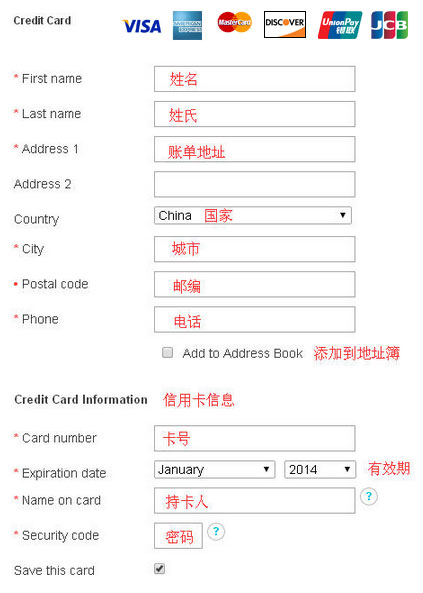
6. You also need to fill in your credit card information and billing address. If you checked "Use this Address for Billing" above, it will sync here automatically. When filling in credit card information, it is recommended not to check "Save this card". This way, your credit card information will not be saved on the website. Although you will need to re-enter the promo code for each payment, it ensures the security of your credit card information.
7. After filling in the information, an order will be generated. Here, you can also click "edit cart" in the upper right corner to modify the purchase contents. After verifying that the purchase contents, shipping address, and payment information are all correct, click "continue checkout" to submit the order. After submitting the order, the order number and order details will be displayed. At this point, the shopping process is complete.
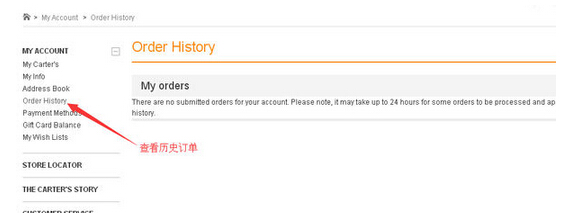
8. After completing the purchase, you can enter the "My orders" page. You will see the order information and order processing status. By clicking the order number, you can modify or cancel the order, but this must be done within one hour of placing the order. If you need to cancel the order, click "Cancel order", or click "Customer service" to contact support.
9. Generally, after placing an order, the Carter's official website will send an email to your registered email address. The Carter's official website usually ships within 1 to 3 days, which is relatively fast. Then just wait to receive your goods.
The above is a complete shopping process on the Carter's official website. Moms and dads can happily shop for clothes for their little ones.