

Ba Bodyguard Online Shop is part of the German BrandsCommerce Group, founded in 1889. All products sold are reliable and 100% authentic. It offers direct shipping to China, supports Alipay and WeChat Pay, and has Chinese customer service, making it a popular site for overseas shopping. Some netizens are already very familiar with German Ba Bodyguard, but many others still don't know much about it. This article will introduce the direct shipping ordering guide for the Ba Bodyguard Chinese Official Website. Interested netizens can take a look.
The German Ba Bodyguard official website can be accessed directly without needing an overseas network environment. When opened, it displays a Chinese interface. However, rest assured, except for orders from bonded warehouses, all orders are shipped directly from Germany, and the order logistics information can be tracked. The Ba Bodyguard official website entrance is as follows:
Official Website Link:https://www.ba.de/
1. Register a Ba Bodyguard Online Shop Account
First, open the Ba Bodyguard Online Shop. As shown in the image below, the page is in Chinese. Different product zones and categories are clear at a glance, not much different from domestic shopping sites like Vipshop or JD.com.
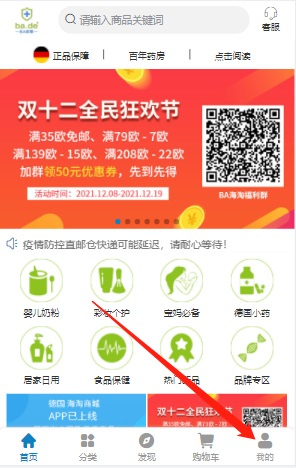
Select the "My Account" page to log in or register for a Bodyguard shop account.
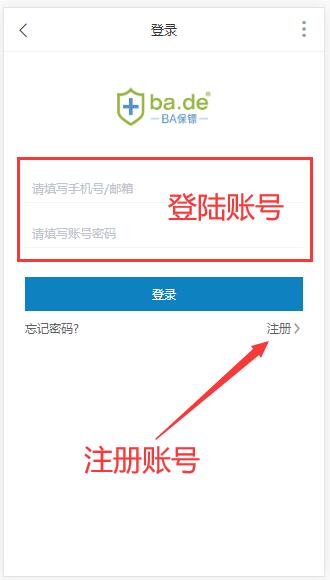
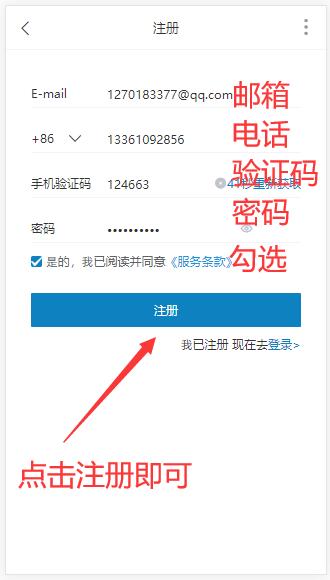
The Ba Bodyguard official website account registration page is as follows. Fill in the email, phone number, verification code, and password in order, then check the box to agree to the terms of service, and click "Register Account" to complete the registration.
2. Browse and Add to Cart on the Ba Bodyguard Online Shop
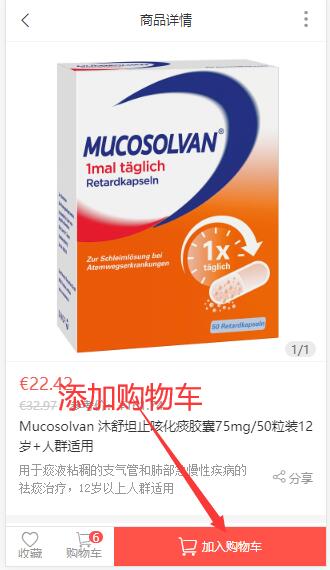
You can search for a brand name or specific product name in the search bar according to your needs. You can also scroll down on the Ba Bodyguard shop homepage, browse the product categories in the middle section, or use the bottom navigation bar to find the desired items. Then, as shown in the image below, add them to the shopping cart.
3. Enter the Ba Bodyguard Online Shop Shopping Cart
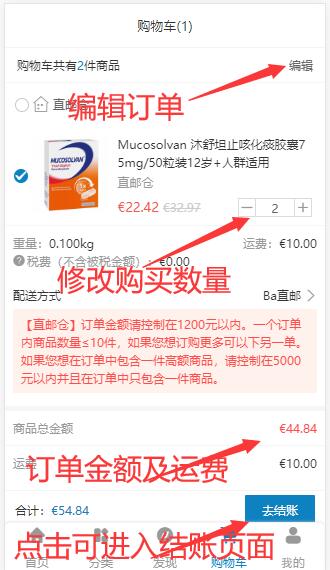
Click the shopping cart icon at the bottom of the image above to enter the Ba Bodyguard shop shopping cart page. As shown below, on this page you can edit products and modify quantities.
4. Fill in the Shipping Address
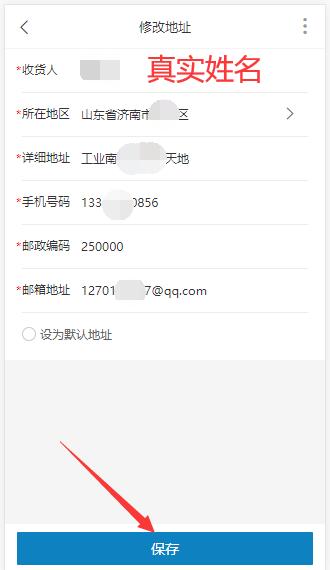
Click "Proceed to Checkout" in the image above to enter the shipping address page. As shown below, fill in the recipient's name, select the region, enter the shipping address, phone number, postal code, email, and other information in order, then click "Save".
5. Upload ID Information
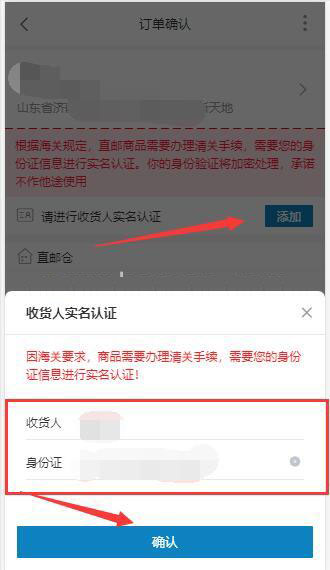
After filling in the shipping information, return to the checkout page. A prompt will appear asking you to upload an ID for customs clearance. Follow the instructions to add the recipient's ID information, as shown below.
6. Confirm the order details are correct, then submit the order.
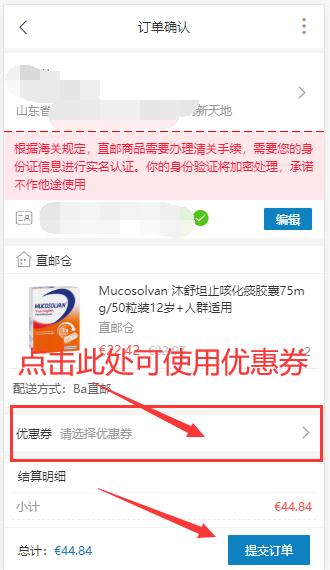
As shown in the image below, on this page you can choose to use available coupons. After confirming the shipping information and order details are correct, click "Submit Order" to proceed to the next step.
7. Pay for the Order
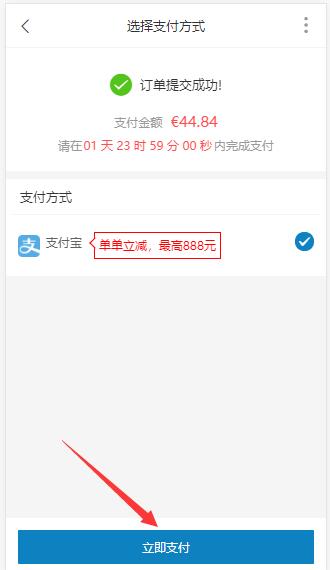
After clicking "Submit Order", you will enter the payment page. As shown below, click "Pay Now" to proceed to the payment page.
8. Wait for Shipping and Delivery
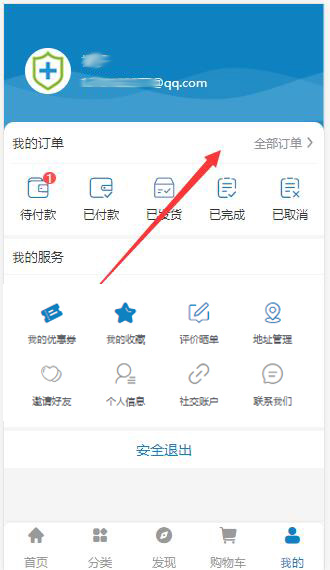
After the order payment is completed, you can view the order number and order status on the "My Account" page of the Ba Bodyguard shop homepage.
Ba Bodyguard Official Website Overseas Shopping Related Questions
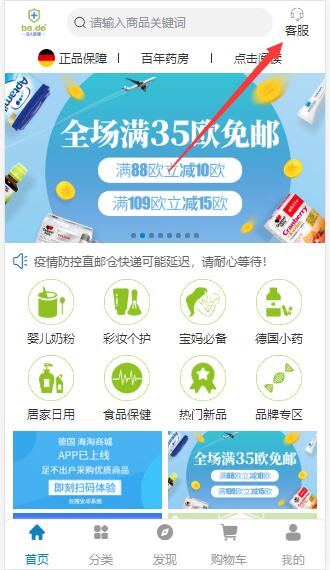
1. Ba Bodyguard Online Shop Customer Service Contact Information
Customer Service Email:
Online Customer Service:
Weibo and WeChat customer service can be found on the Ba Bodyguard shop PC version:
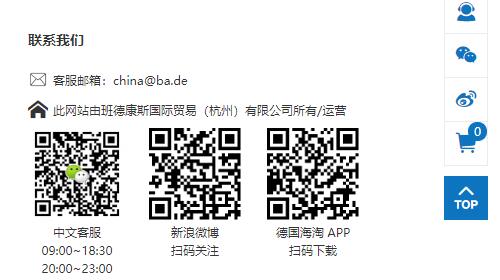
Customer Service Working Hours: Monday to Friday, 9:00 - 18:30 (Beijing Time)
2. Ba Bodyguard Online Shop Shipping Policy
Shipping Time
Orders Shipped Directly from Germany:
1) After the order is submitted, the Ba Bodyguard warehouse will ship within 1-7 working days.
2) After the order is shipped, the delivery time is 12-18 working days.
Orders from Bonded Warehouse:
1) After the order is submitted, the order will be shipped within 1-2 working days.
2) After the order is submitted, the delivery time is 2-3 working days.
Shipping Fee Standards:
1) Direct Mail Warehouse: Orders over €35 in the shop will automatically have the shipping fee waived at the order submission page, or you can choose to use a free shipping coupon.
? ? One order must be less than 1200 RMB, each order must contain fewer than 10 items, and each ID number can only place two orders per week. If the recipient's information or ID is used to place orders too many times in one week, it may cause the shipping label generation to fail, leading to delayed shipment or the order being returned from the Frankfurt logistics transfer point.
2) Bonded Warehouse: Free shipping for all items.
? ? Orders from the bonded warehouse have no quantity limit, but the single order amount must not exceed 5000 RMB. The amount spent on orders from the bonded warehouse will count towards the individual's cross-border personal consumption quota (the individual quota is 26000 RMB).
Logistics Tracking:
Methods for checking logistics are as follows:
1) The Ba Bodyguard official website [My Account - My Orders] page displays real-time logistics tracking, which can be viewed directly.
2) You can also enter the logistics carrier's official website and use your order tracking number and the recipient's postal code for inquiries.
3. Ba Bodyguard Online Shop Direct Mail Tax Issues
Regarding tax issues, the official website explains as follows:
? ? Users of this website are required to pay the corresponding taxes according to relevant laws, regulations, and policies. After the user pays the tax themselves, they can send the customs duty receipt and order number via their registered website email to the Chinese customer service email
? ? However, the actual situation is that all items on the Ba Bodyguard Online Shop are shipped directly with tax included, and they will not be taxed when entering Chinese customs.
4. Ba Bodyguard Online Shop Return Policy
Return Policy:
1) The Ba Bodyguard Online Shop does not support returns or refunds for any reason within 7 days.
2) If the buyer provides a test report or the brand confirms a quality issue, returns and refunds are supported.
3) For shipping issues (damage, wrong item sent, missing items, lost package, expiration date, melting due to high temperature, etc.), the buyer can provide photos of the actual items within 3 working days of receiving the goods for after-sales confirmation, after which a full refund will be issued.
4) For returns due to personal reasons of the consumer, the shipping costs are borne by the individual. The refund will be the full amount minus the shipping costs, taxes, and the cost of any damage to the goods incurred during transport.