
Kidsroom is a well-known German retailer of mother and baby products. For parents in China, attention to this site often starts with overseas purchases of car safety seats. Kidsroom now also caters to domestic users, offering a consistently good shopping experience. Today, I'll share the latest guide to buying child car safety seats from the Kidsroom website. If you're planning to make a purchase, keep an eye on this updated guide.
About the Website
Kidsroom.de offers over 20,000 children's and baby products online, making it one of Germany's largest online baby product stores. With over 13 years of experience in the baby product sector, it provides essential items for your little one up to age 6, including child car safety seats, infant carriers, strollers, stair gates, and other child safety products. Their selection of child car safety seats is particularly comprehensive.
Overseas Purchase Order Information
The website currently supports German, English, and Chinese: http://www.kidsroom.de/zh_CN.
Shipping costs and product prices automatically include a 19% tax refund (since December 4, 2014, prices displayed for Chinese customers already reflect the tax deduction).
Payment methods currently available for Chinese customers include: Visa or Mastercard credit cards; PayPal; UnionPay; Amex or JCB; Alipay. Multiple payment options with automatic currency conversion.
No need to choose a forwarding agent; Kidsroom offers direct shipping.
Customer service email:
Overseas Purchase Process
1. Registration
Open the website, which now supports Chinese. Select the language at the top—choose the Chinese flag to switch to the Chinese version. Once on the Chinese site, click the registration button.
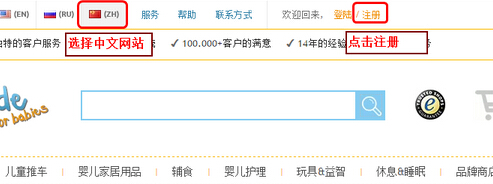
2. Fill in Kidsroom Registration Information
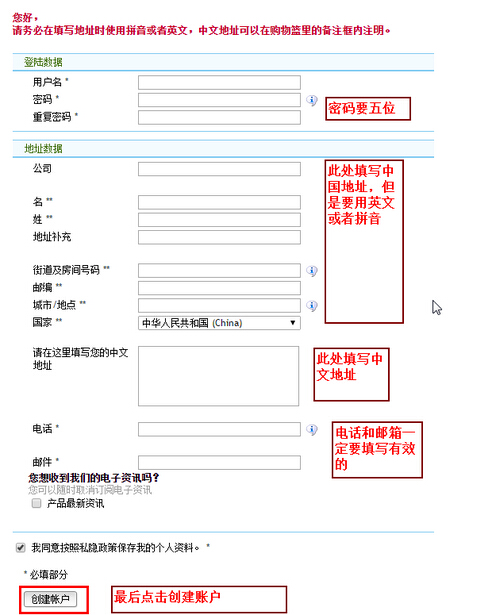
It is recommended to translate your address into Pinyin, listing details from smallest to largest unit, separated by commas or spaces for readability. For example: Yangguangxiaoqu, Mahuanglu 18hao, Tian'anzhen, Gongyeyuanqu, SuzhouShi, Jiangsu Sheng. Make sure to include your phone number—it's crucial.
Phone numbers and address formats can follow domestic standards, as this information is only used domestically and not in Germany.
Below is a screenshot of the registration page. Fields marked with an asterisk * must be filled in; others are optional.
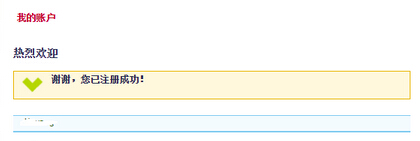
After clicking "Create User," the following page will appear, indicating successful registration.
3. Using the Super 1000 Car Seat as an Example for the Kidsroom Purchase Guide
Directly enter "Britax" in the search box and click search. Find the model you want in the results and click to view the product details page.
In the middle of the page, you can see the stocking period, e.g., 1-3 working days, meaning the item is in stock and will be shipped within 1-3 working days after order confirmation. Once you've confirmed the model and details, click the "Add to Cart" button.
If there is a yellow box with a checkmark next to it, it means the item is out of stock and needs to be ordered. "Ready for dispatch: ca. 10 work days" means it will take about 10 working days to stock. Kidsroom will ship approximately 10 working days after receiving the item from the factory. Be sure to check this carefully when placing an order to avoid delays in your use.
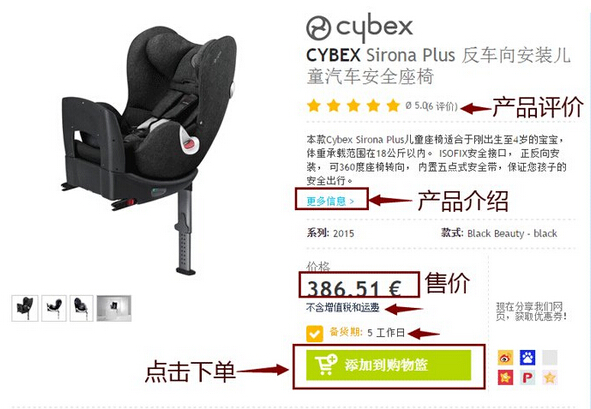
If you have other items to buy, continue searching and adding them to the cart. Then click the "Shopping Cart" icon in the top right corner to view your items and proceed to payment.
At this step, you need to enter a coupon code and select a payment method. It is recommended to choose Alipay for convenience and speed.
For the latest official Kidsroom coupon codes, enter the code and be sure to click "Redeem Coupon." After redeeming, you will see the corresponding discount information.
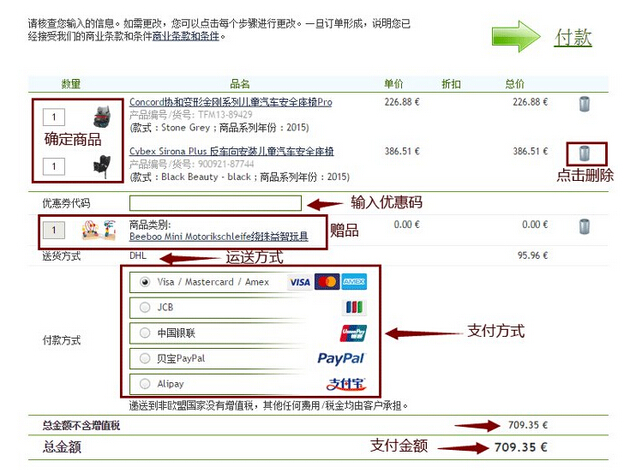
Click "Next" to confirm the address.
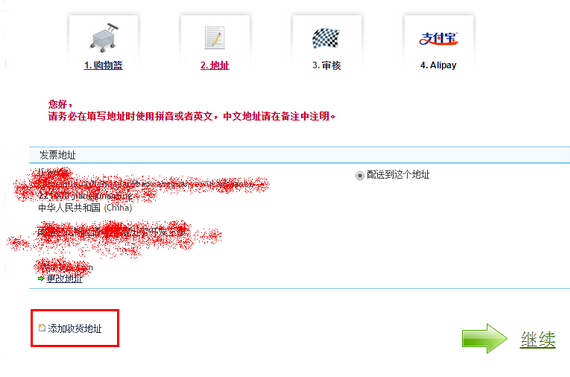
If the invoice address differs from the shipping address, you can click "Add Shipping Address" below. If they are the same, simply click "Continue."
Further confirm that the billing address and shipping address are correct.
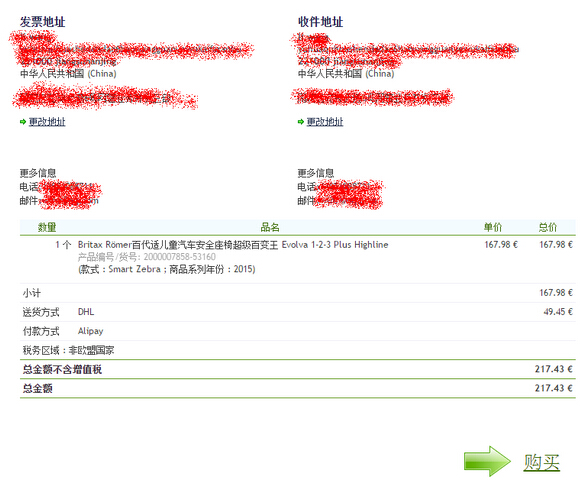
After completing the details, proceed to review and complete the payment.
Once payment is completed, a 6-digit order number will generally be generated. Please keep this number safe, as you can use it to check your order status online, by phone, or via email. Our website will not be updated later.
We will notify you by email once the item has been shipped! See example below:
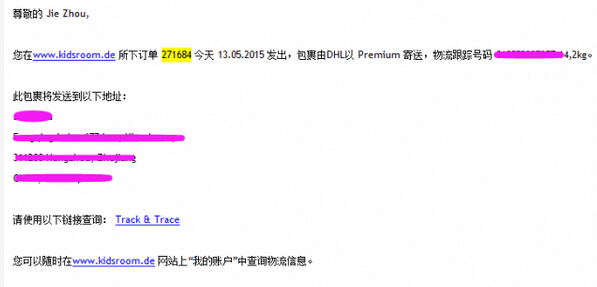
This is an example of our email notification. The tracking number can be checked at www.dhl.de. See below:
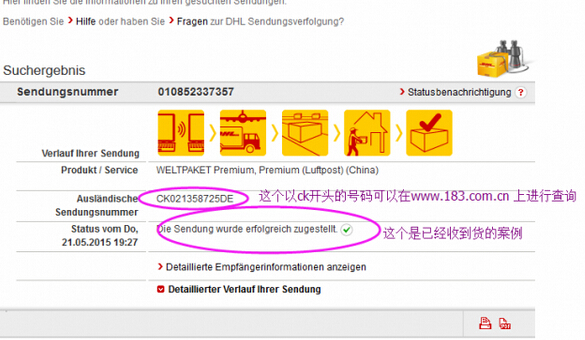
This will show a number starting with CK, which is the tracking code for domestic postal service in China. It can be checked at www.183.com.cn.
Sometimes an IPZ status may appear. If this happens, don't worry—it just means the tracking hasn't been updated and doesn't mean your package has stopped moving or is unattended.
Next, just wait for Kidsroom to ship. Direct shipping usually takes 15-20 days, but as we all know, overseas shopping involves a bit of luck!