

Moose Limited (MLTD) is a website that brings together multiple streetwear brands, such as popular labels like Stussy and OBEY, skateboarding brands HUF and VANS, as well as the well-known Canadian bag brand Herschel Supply Co., and more.

Plus, the site often features special deals on popular styles, frequently attracting trendsetters to shop for their gear here.
If you see something you like, be sure to grab it quickly!
As a trendsetter, you absolutely can't miss out!
Step 1: Log In
MLTD Official Website: http://www.mltd.com/
First, go to the MLTD official website.
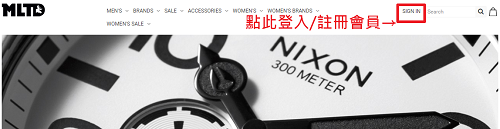
Click on the 【SIGN IN】 button in the upper right corner of the homepage to log in or register as a member.
Step 2: Enter Member Information
A pop-up window will appear.
1. If you are already a member, simply enter your account and password to log in.
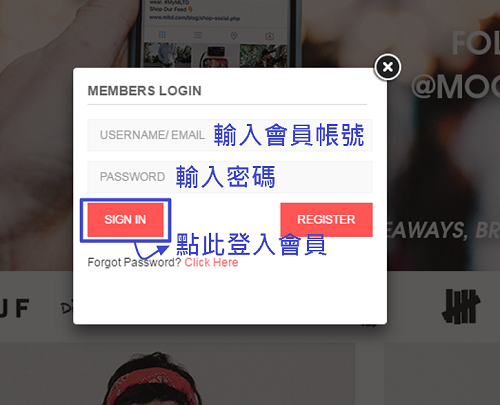
2. If you are not yet a member, please click 【REGISTER】 to create a new account~
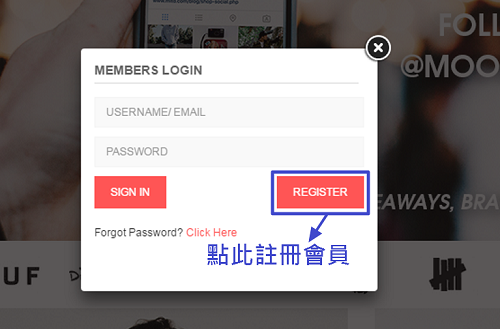
At this point, the page will redirect to the next page.
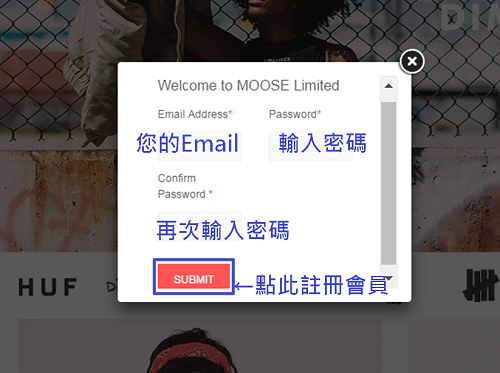
After filling in the registration fields in order, click 【SUBMIT】 to register as a member.
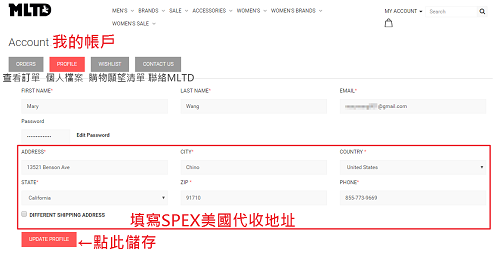
Once registration is successful, you will be logged in directly. You can go to 【MY ACCOUNT】 to edit your personal account information,
including the address of your commonly used US freight forwarder warehouse, so you won't have to fill it in again during checkout!
After saving, you're ready to start shopping!
If you need to modify your personal information or check order details, you can do so here.
Step 3: Start Shopping~

On the homepage, you can shop by different product categories or search for products directly to start shopping!
Click into a category page, find the item you like,
and you can clearly see the price, color, size, and other detailed product information.
I picked out some Stussy apparel that's a must-have for trendsetters!
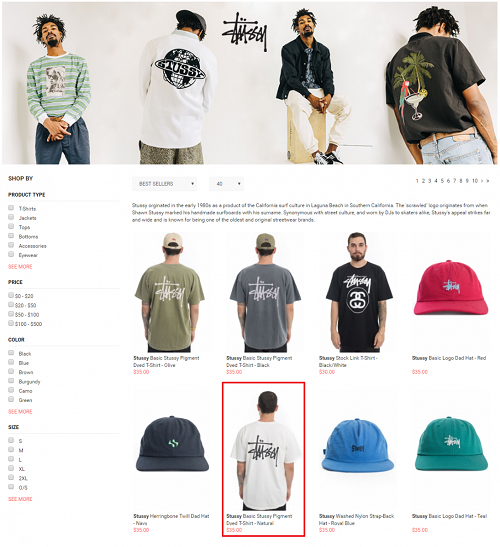
Click to enter the product page, and you can clearly see the relevant product information.
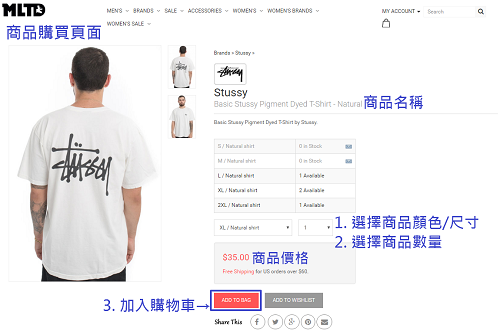
After selecting 【ADD TO BAG】, the website will add the item you want to purchase to your shopping cart.
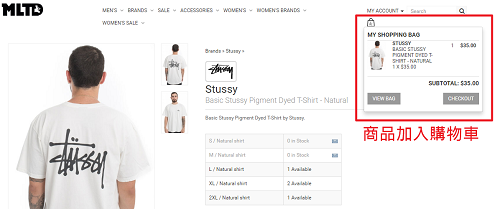
If you need to buy other items, you can simply select them and repeat the steps above to add them to your cart before checking out all at once.
If you don't need to continue shopping, click 【VIEW BAG】 in the upper right corner to view the items in your cart and proceed to checkout.
Step 4: Shopping Cart List
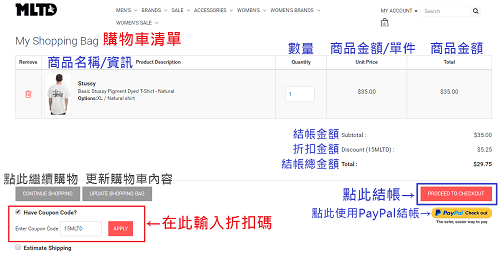
In the shopping cart list, you can review all the items you've selected for this purchase, their details, and the total amount.
This step allows you to do a final confirmation of your order before proceeding to checkout.
Once confirmed, click 【PROCEED TO CHECKOUT】 to proceed with the checkout steps.
If you have a discount code, you can also enter it here~
After entering the discount code, the checkout total in the cart will directly show the discounted amount!
Step 5: Checkout
On the checkout page, there are three sections where you need to fill in information and confirm. I'll explain each one for you!
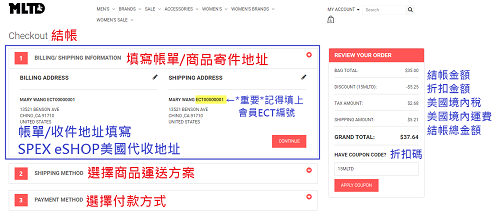
1. First, "BILLING/SHIPPING INFORMATION": This is for filling in the billing and shipping address.
This is the receiving address of the US freight forwarder.
If you need to edit the "BILLING/SHIPPING INFORMATION",
click the edit button on the box, and it will redirect you to another page (as shown below).
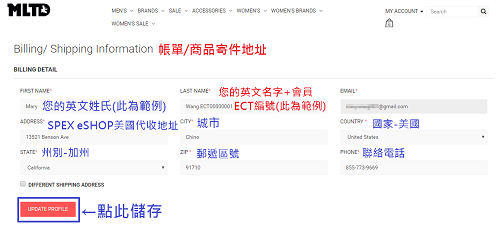
After filling it in, click 【UPDATE PROFILE】 to save.
2. "SHIPPING METHOD": Select the shipping method for your items.
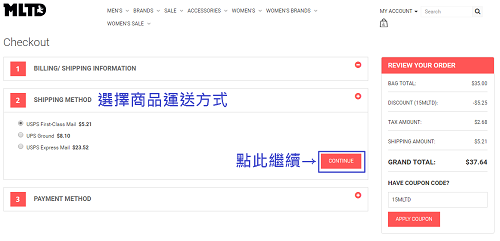
If you want to receive your items sooner, you can also choose to pay a little extra for a faster shipping method!
After selecting the shipping option you need, click 【CONTINUE】 to proceed with the checkout steps.
3. "PAYMENT METHOD": Enter your credit card information and billing address.
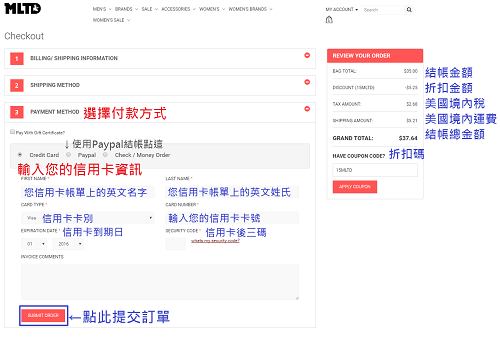
Here, you must enter your credit card details in the fields provided.
This is for MLTD to verify with your credit card company; they won't send a bill to your home~
(After successful payment, your credit card statement will show the store name and amount charged.)
Once all order information is confirmed correct, you can press 【SUBMIT ORDER】 to submit the order!
Step 6: Complete Your Order
Finally, after submitting the total order information, review and confirm it, and you're done~
Then check your email to see if MLTD has sent you a message.
After that, go to the freight forwarder to pre-register the order.